
Data versioning
data_versioning.RmdThis vignette will cover the data versioning functionality of the
resrepo package, considering the following use cases:
- Your data are too large to be stored in a git repository
- You want to explore alternative workflows for your data analysis
- You want to store your data externally
The function version_setup is used in each of these
cases to create a versioned repository that properly stores data. We
begin in this way to maintain consistent structure of
resrepo repositories.
‘Setting up data versioning’ illustrates how to use the function
version_setupto create a versioned repository. This will prevent git from tracking data.‘Adding a new version’ will show you how to explore alternative approaches to data analysis (e.g. a different version of data filtering). This section illustrates how to add new versions of the code and data, and merge branches.
‘Outsourcing the data’ demonstrates how to use
version_setupto outsource your data storage to a different location, such as a folder synced to the cloud or a hard drive. You can still add new versions and merge branches when outsourcing your data.‘Moving the versions’ demonstrates how to use
version_relinkto move your data to a different location (either locally or externally) once your repository is already versioned.
Setting up data versioning
If your data is too big for GitHub and/or you want to version your
data, we can use the function version_setup.
This is the step where you need to decide where data will be stored
(locally or externally). The command is the same, but depending on your
choice, you will need to set the resources_path argument.
By default, your data will be stored locally in your repository (but not
tracked on GitHub). This is further explained in this section. Instead,
if you would like to mirror your data to a cloud repository
(i.e. Dropbox, OneDrive) you can specify an external location for your
data storage using the resources_path argument in
version_setup. You might want to do this so that your data
are backed-up, accessible from another machine, or to collaborators.
You can always change the location of your data later, and you can refer to the section below (‘Moving the versions’) for instructions on how to proceed.
You add versioning option to an existing resrepo
repository using the function version_setup().
We demonstrate this by using our example repository from the vignette
workflow - you might be already familiar with it. If you
still have that repository, you don’t need to run the code below,
otherwise, let us start by recreating the workflow example
repository:
library(resrepo)
init_resrepo()
file.copy(
  from = system.file("vignette_example/tux_measurements.csv",
    package = "resrepo"
  ),
  to = path_resrepo("/data/raw/original/tux_measurements.csv"),
  overwrite = TRUE
)
file.copy(
  from = system.file("vignette_example/s01_download_penguins.Rmd",
    package = "resrepo"
  ),
  to = path_resrepo("/code/s01_download_penguins.Rmd"),
  overwrite = TRUE
)
knit_to_results(path_resrepo("/code/s01_download_penguins.Rmd"))
#> processing file: s01_download_penguins.Rmd
#> output file: s01_download_penguins.knit.md
#>
#> Output created: s01_download_penguins.pdf
file.copy(
  from = system.file("vignette_example/s02_merge_clean.Rmd",
    package = "resrepo"
  ),
  to = path_resrepo("/code/s02_merge_clean.Rmd"),
  overwrite = TRUE
)
knit_to_results(path_resrepo("/code/s02_merge_clean.Rmd"))
#> processing file: s02_merge_clean.Rmd
#> output file: s02_merge_clean.knit.md
#>
#> Output created: s02_merge_clean.pdf
file.copy(
  from = system.file("vignette_example/s03_pca.Rmd", package = "resrepo"),
  to = path_resrepo("/code/s03_pca.Rmd"),
  overwrite = TRUE
)
knit_to_results(path_resrepo("/code/s03_pca.Rmd"))
#> processing file: s03_pca.Rmd
#> output file: s03_pca.knit.md
#>
#> Output created: s03_pca.pdf
git2r::add(path = ".")
git2r::commit(message = "Set up", all = TRUE)
Let us check that we do have indeed a full repository:
fs::dir_tree()
#> .
#> ├── README.md
#> ├── code
#> │   ├── README.md
#> │   ├── s01_download_penguins.Rmd
#> │   ├── s02_merge_clean.Rmd
#> │   └── s03_pca.Rmd
#> ├── data
#> │   ├── README.md
#> │   ├── intermediate
#> │   │   ├── README.md
#> │   │   └── s02_merge_clean
#> │   │       ├── penguins_na_omit.csv
#> │   │       ├── renv_s02_merge_clean.json
#> │   │       └── renv_s03_pca.json
#> │   └── raw
#> │       ├── README.md
#> │       ├── original
#> │       │   └── tux_measurements.csv
#> │       └── s01_download_penguins
#> │           ├── palmer_penguins.csv
#> │           └── renv_s01_download_penguins.json
#> ├── results
#> │   ├── README.md
#> │   ├── s01_download_penguins
#> │   │   ├── README.md
#> │   │   └── s01_download_penguins.pdf
#> │   ├── s02_merge_clean
#> │   │   ├── README.md
#> │   │   └── s02_merge_clean.pdf
#> │   └── s03_pca
#> │       ├── README.md
#> │       ├── s03_pca.pdf
#> │       └── s03_pca_files
#> │           ├── figure-latex
#> │           │   └── pca_plot-1.png
#> │           └── s03_pca_files
#> │               └── figure-latex
#> │                   └── pca_plot-1.png
#> └── writing
#>     └── README.md
Here, we show the default option, where the
resources_path argument is not specified. The function will
automatically create the right set up of folders in the expected order,
including a subfolder named versions in your repository
(locally).
version_setup(quiet = TRUE, resources_path = NULL)
#> [1] TRUE
Let us check what happened:
fs::dir_tree()
#> .
#> ├── README.md
#> ├── code
#> │   ├── README.md
#> │   ├── s01_download_penguins.Rmd
#> │   ├── s02_merge_clean.Rmd
#> │   └── s03_pca.Rmd
#> ├── data
#> │   ├── README.md
#> │   ├── intermediate
#> │   ├── raw
#> │   └── version_meta
#> │       ├── initial.meta
#> │       ├── intermediate_in_use.meta
#> │       ├── raw_in_use.meta
#> │       └── starting.meta
#> ├── results
#> │   ├── README.md
#> │   ├── s01_download_penguins
#> │   │   ├── README.md
#> │   │   └── s01_download_penguins.pdf
#> │   ├── s02_merge_clean
#> │   │   ├── README.md
#> │   │   └── s02_merge_clean.pdf
#> │   └── s03_pca
#> │       ├── README.md
#> │       ├── s03_pca.pdf
#> │       └── s03_pca_files
#> │           ├── figure-latex
#> │           │   └── pca_plot-1.png
#> │           └── s03_pca_files
#> │               └── figure-latex
#> │                   └── pca_plot-1.png
#> ├── versions
#> │   ├── initial
#> │   │   └── intermediate
#> │   │       ├── README.md
#> │   │       └── s02_merge_clean
#> │   │           ├── penguins_na_omit.csv
#> │   │           ├── renv_s02_merge_clean.json
#> │   │           └── renv_s03_pca.json
#> │   └── starting
#> │       └── raw
#> │           ├── README.md
#> │           ├── original
#> │           │   └── tux_measurements.csv
#> │           └── s01_download_penguins
#> │               ├── palmer_penguins.csv
#> │               └── renv_s01_download_penguins.json
#> └── writing
#>     └── README.md
We can see that both data/raw and
data/intermediate have been moved into
versions, intermediate is under the
initial version, while raw is under the
starting directory. The function has also created four
metadata files: intermediate_in_use.meta and
raw_in_use.meta keep track of the versions of data
currently in use, initial.meta and
starting.meta are, by default, the first version of the
data.
In this vignette, we will be focusing only on versioning
data/intermediate. Therefore, raw_in_use.meta
will point to the starting version of data/raw and will not
change.
data/intermediate and data/raw have now
become links, which is why they are highlighted in a different colour
(light purple) in the tree above. We can use these links as if they were
directories, and check that they point correctly to the directories in
versions.
dir(path_resrepo("/data/raw"))
#> [1] "original"              "README.md"             "s01_download_penguins"
However, note that the data are now NOT being tracked by git, as
versions is in .gitignore. So, you want to make sure that
you have a reliable way to back up your data.
Adding a new version
We might now want to revise the filtering of data that we are doing.
This will affect some intermediate data and results. Whilst results are
tracked in the git repository, data are not. However, we might want to
compare the results of the alternative filtering approaches. We can use
the version_add() function to create a new version of the
data, which we can modify and compare to the initial
version we created earlier. It will also create a new branch in the git
repository (with the same name as the data version):
version_add(
  intermediate_new_version = "new_filtering",
  intermediate_description = "Filtering out some data"
)
#> version new_filtering created
#> [1] TRUE
We have called our new version new_filtering, and we can
now see that we have switched to a new branch in the git repository
called new_filtering, as indicated by (HEAD) below:
git2r::branches()
#> $main
#> [27bfbd] (Local) main
#>
#> $new_filtering
#> [9c75dd] (Local) (HEAD) new_filtering
Now data/raw and data/intermediate are
symlinks to the new_filtering version of the data, which is
found under versions/new_filtering. Each version will be
under a new branch of the repository.
A symlink is a link to a file or directory. When you access a symlink, it behaves as if you are accessing the target file or directory. This means that when you read from or write to a symlink, you are actually reading from or writing to the target file or directory.
It is also in theory possible to version data/raw by
adding “raw_new_version” to the version_add function, but
this is NOT RECOMMENDED, as raw data should ideally not be changed (it
is supposed to represent the data in their original format).
fs::dir_tree()
#> .
#> ├── README.md
#> ├── code
#> │   ├── README.md
#> │   ├── s01_download_penguins.Rmd
#> │   ├── s02_merge_clean.Rmd
#> │   └── s03_pca.Rmd
#> ├── data
#> │   ├── README.md
#> │   ├── intermediate
#> │   ├── raw
#> │   └── version_meta
#> │       ├── initial.meta
#> │       ├── intermediate_in_use.meta
#> │       ├── new_filtering.meta
#> │       ├── raw_in_use.meta
#> │       └── starting.meta
#> ├── results
#> │   ├── README.md
#> │   ├── s01_download_penguins
#> │   │   ├── README.md
#> │   │   └── s01_download_penguins.pdf
#> │   ├── s02_merge_clean
#> │   │   ├── README.md
#> │   │   └── s02_merge_clean.pdf
#> │   └── s03_pca
#> │       ├── README.md
#> │       ├── s03_pca.pdf
#> │       └── s03_pca_files
#> │           ├── figure-latex
#> │           │   └── pca_plot-1.png
#> │           └── s03_pca_files
#> │               └── figure-latex
#> │                   └── pca_plot-1.png
#> ├── versions
#> │   ├── initial
#> │   │   └── intermediate
#> │   │       ├── README.md
#> │   │       └── s02_merge_clean
#> │   │           ├── penguins_na_omit.csv
#> │   │           ├── renv_s02_merge_clean.json
#> │   │           └── renv_s03_pca.json
#> │   ├── new_filtering
#> │   │   └── intermediate
#> │   │       ├── README.md
#> │   │       └── s02_merge_clean
#> │   │           ├── penguins_na_omit.csv
#> │   │           ├── renv_s02_merge_clean.json
#> │   │           └── renv_s03_pca.json
#> │   └── starting
#> │       └── raw
#> │           ├── README.md
#> │           ├── original
#> │           │   └── tux_measurements.csv
#> │           └── s01_download_penguins
#> │               ├── palmer_penguins.csv
#> │               └── renv_s01_download_penguins.json
#> └── writing
#>     └── README.md
Imagine that we have just been told that the first 10 measurements of
the penguins might be considered unreliable, as the scales were showing
a low battery warning. We now will edit the code that merges and cleans
the data, and modify it to remove the first 10 penguins from the
dataset. We use a pre-prepared script for this, which we copy to the
code directory:
file.copy(
  from = system.file("vignette_example/new_filtering/s02_merge_clean.Rmd",
    package = "resrepo"
  ),
  to = path_resrepo("code/s02_merge_clean.Rmd"),
  overwrite = TRUE
)
#> [1] TRUE
If this was a “real” project, since the new_filtering
version is a new branch of the repository, we could edit the script in
the code directory and commit the changes.
We can now remove the full version of the intermediate dataset in the
new_filtering folder so that we can replace it with a new
version that excludes the first 10 penguins.
fs::file_delete(path_resrepo("data/intermediate/s02_merge_clean"))Note that penguins_na_omit.csv is still in the
versions/initial folder, as we have not removed it from
versions/initial but only from the
versions/new_filtering directory.
fs::dir_tree()
#> .
#> ├── README.md
#> ├── code
#> │   ├── README.md
#> │   ├── s01_download_penguins.Rmd
#> │   ├── s02_merge_clean.Rmd
#> │   └── s03_pca.Rmd
#> ├── data
#> │   ├── README.md
#> │   ├── intermediate
#> │   ├── raw
#> │   └── version_meta
#> │       ├── initial.meta
#> │       ├── intermediate_in_use.meta
#> │       ├── new_filtering.meta
#> │       ├── raw_in_use.meta
#> │       └── starting.meta
#> ├── results
#> │   ├── README.md
#> │   ├── s01_download_penguins
#> │   │   ├── README.md
#> │   │   └── s01_download_penguins.pdf
#> │   ├── s02_merge_clean
#> │   │   ├── README.md
#> │   │   └── s02_merge_clean.pdf
#> │   └── s03_pca
#> │       ├── README.md
#> │       ├── s03_pca.pdf
#> │       └── s03_pca_files
#> │           ├── figure-latex
#> │           │   └── pca_plot-1.png
#> │           └── s03_pca_files
#> │               └── figure-latex
#> │                   └── pca_plot-1.png
#> ├── versions
#> │   ├── initial
#> │   │   └── intermediate
#> │   │       ├── README.md
#> │   │       └── s02_merge_clean
#> │   │           ├── penguins_na_omit.csv
#> │   │           ├── renv_s02_merge_clean.json
#> │   │           └── renv_s03_pca.json
#> │   ├── new_filtering
#> │   │   └── intermediate
#> │   │       └── README.md
#> │   └── starting
#> │       └── raw
#> │           ├── README.md
#> │           ├── original
#> │           │   └── tux_measurements.csv
#> │           └── s01_download_penguins
#> │               ├── palmer_penguins.csv
#> │               └── renv_s01_download_penguins.json
#> └── writing
#>     └── README.md
If we now knit the new version of the code, where we remove the first
10 penguins, the data are written to the
versions/new_filtering/intermediate directory.
knit_to_results(path_resrepo("/code/s02_merge_clean.Rmd"))
#> processing file: s02_merge_clean.Rmd
#> output file: s02_merge_clean.knit.md
#> /opt/hostedtoolcache/pandoc/3.8.3/x64/pandoc +RTS -K512m -RTS s02_merge_clean.knit.md --to latex --from markdown+autolink_bare_uris+tex_math_single_backslash --output s02_merge_clean.tex --lua-filter /home/runner/work/_temp/Library/rmarkdown/rmarkdown/lua/pagebreak.lua --lua-filter /home/runner/work/_temp/Library/rmarkdown/rmarkdown/lua/latex-div.lua --embed-resources --standalone --syntax-highlighting tango --pdf-engine pdflatex --variable graphics --extract-media s02_merge_clean_files --variable 'geometry:margin=1in'
#>
#> Output created: s02_merge_clean.pdf
#> [1] TRUE
fs::dir_tree()
#> .
#> ├── README.md
#> ├── code
#> │   ├── README.md
#> │   ├── s01_download_penguins.Rmd
#> │   ├── s02_merge_clean.Rmd
#> │   └── s03_pca.Rmd
#> ├── data
#> │   ├── README.md
#> │   ├── intermediate
#> │   ├── raw
#> │   └── version_meta
#> │       ├── initial.meta
#> │       ├── intermediate_in_use.meta
#> │       ├── new_filtering.meta
#> │       ├── raw_in_use.meta
#> │       └── starting.meta
#> ├── results
#> │   ├── README.md
#> │   ├── s01_download_penguins
#> │   │   ├── README.md
#> │   │   └── s01_download_penguins.pdf
#> │   ├── s02_merge_clean
#> │   │   ├── README.md
#> │   │   └── s02_merge_clean.pdf
#> │   └── s03_pca
#> │       ├── README.md
#> │       ├── s03_pca.pdf
#> │       └── s03_pca_files
#> │           ├── figure-latex
#> │           │   └── pca_plot-1.png
#> │           └── s03_pca_files
#> │               └── figure-latex
#> │                   └── pca_plot-1.png
#> ├── versions
#> │   ├── initial
#> │   │   └── intermediate
#> │   │       ├── README.md
#> │   │       └── s02_merge_clean
#> │   │           ├── penguins_na_omit.csv
#> │   │           ├── renv_s02_merge_clean.json
#> │   │           └── renv_s03_pca.json
#> │   ├── new_filtering
#> │   │   └── intermediate
#> │   │       ├── README.md
#> │   │       └── s02_merge_clean
#> │   │           ├── penguins_na_omit.csv
#> │   │           └── renv_s02_merge_clean.json
#> │   └── starting
#> │       └── raw
#> │           ├── README.md
#> │           ├── original
#> │           │   └── tux_measurements.csv
#> │           └── s01_download_penguins
#> │               ├── palmer_penguins.csv
#> │               └── renv_s01_download_penguins.json
#> └── writing
#>     └── README.md
We can now compare the datasets of our two versions, and we can see
that our current version of the data, which is found in
new_filtering, has 10 fewer penguins than the
initial version.
penguins_new_filtering <- read.csv(path_resrepo(
  "data/intermediate/s02_merge_clean/penguins_na_omit.csv"
))

penguins_initial <- read.csv(path_resrepo(
  "/versions/initial/intermediate/s02_merge_clean/penguins_na_omit.csv"
))

nrow(penguins_initial)
#> [1] 377
nrow(penguins_new_filtering)
#> [1] 367
Merging back into main
If we are happy with the new version, we can merge it back into the
main branch. This will mean that our branch main will now
use the new version of the data (with the 10 less penguins). At the same
time, this means that we will replace the previous code with the code in
the new branch. You may want to keep both versions of the code if you
are interested in using both versions of the data. If we are absolutely
sure about merging back into the main branch, before doing it, we need
to commit the changes to the branch new_filtering.
How to commit in RStudio:
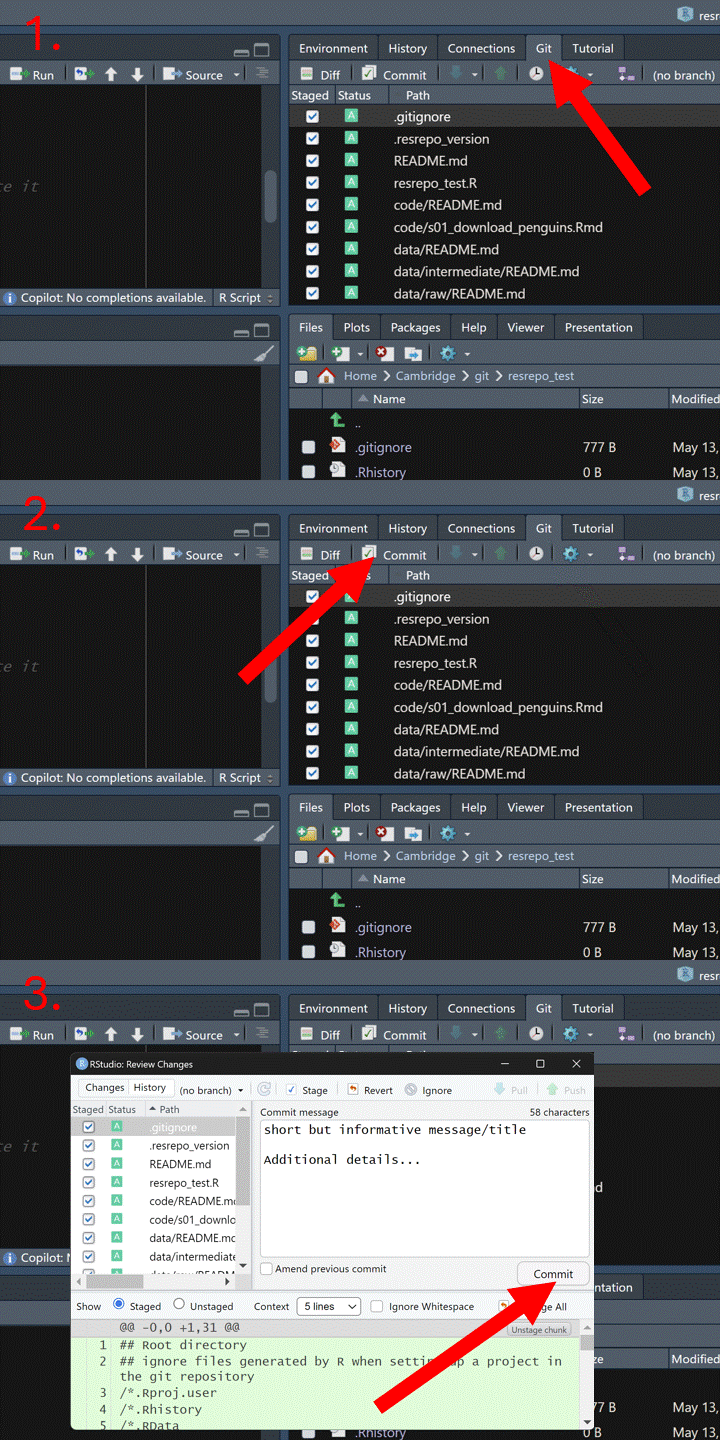
Now we can merge the branch new_filtering into the
branch main, and check out main. To do this,
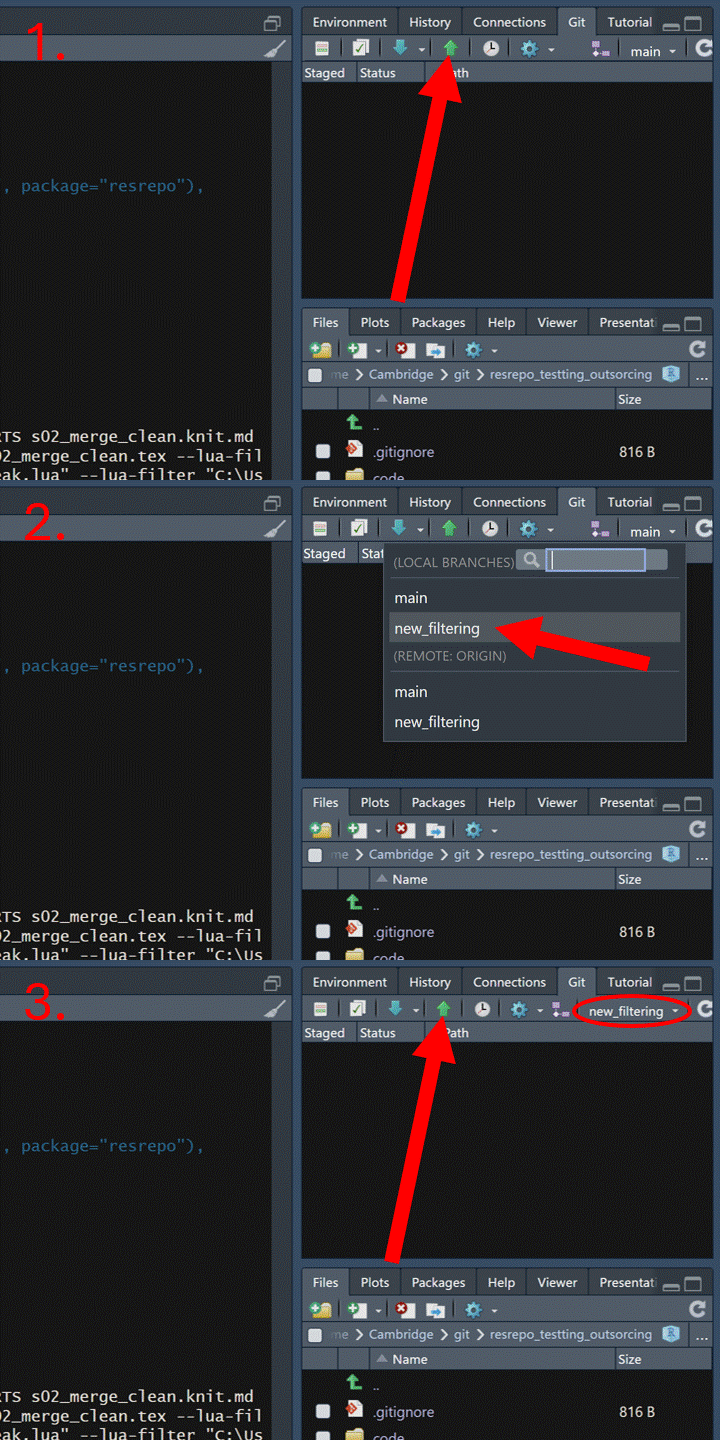
we can use the GitHub interface, following the steps below.
First, we need to push both branches to GitHub:
Now go to your repository page on GitHub. Click the “Pull requests”
tab. Then click the “New pull request” button and select base branch
(e.g., main) and compare branch (e.g.,
new_filtering). Click “Create pull request”, and add a
description. Click “Merge pull request” to complete the merge. Now you
can delete the new_filtering branch.
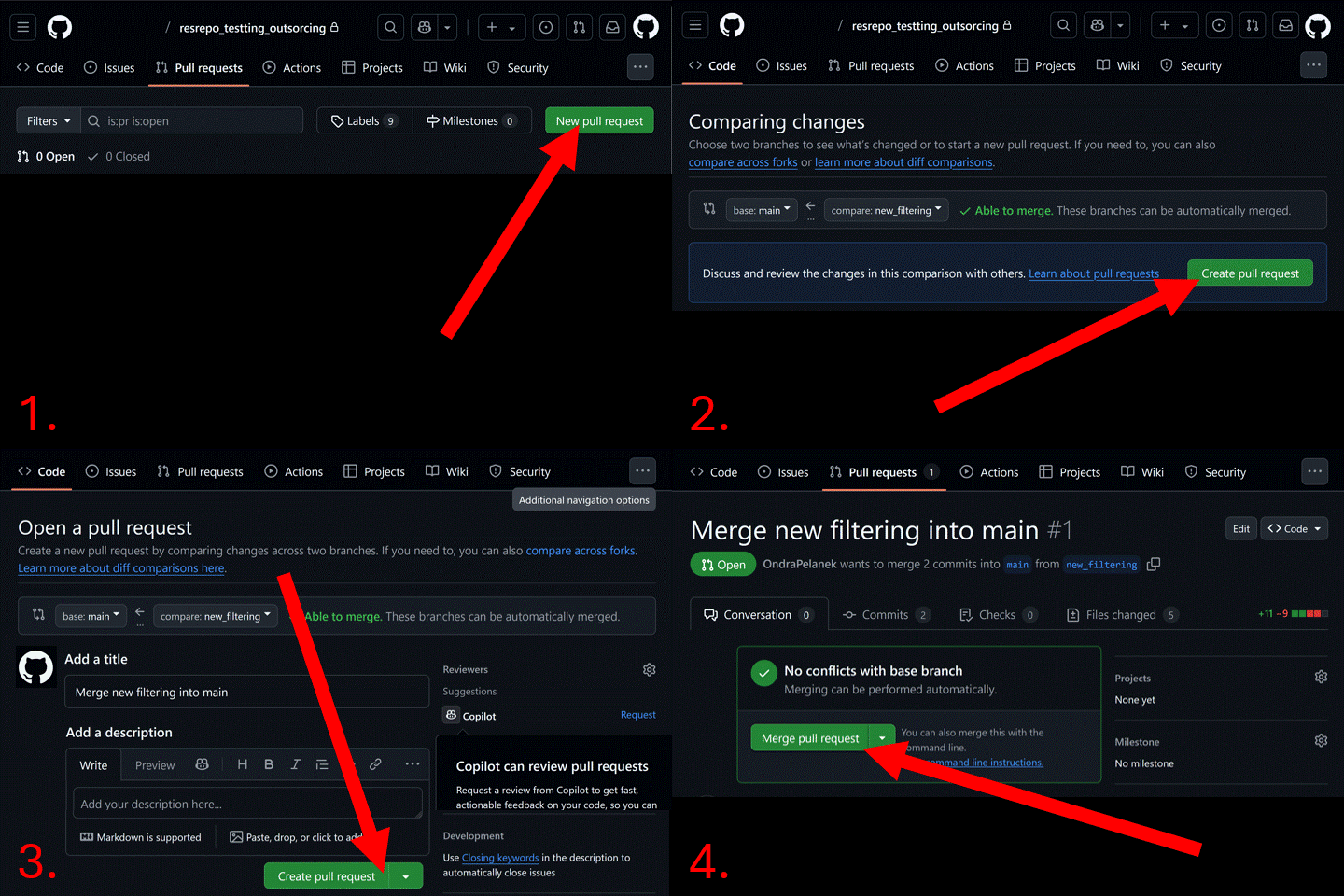
And now we have successfully versioned and updated our repository.
Outsourcing the data
In this section, we demonstrate how to use the
version_setup function to outsource your data.
Often, you may want to outsource your data so that it is backed up,
accessible from another machine, or easily shared with collaborators. In
such cases, you might want to store your data in a different location,
such as a cloud repository (e.g. Dropbox, OneDrive) that mirrors your
data files. You can specify an external location for your data storage
using the resources_path argument in
version_setup.
NOTE: Make sure that you have enough space on your hard drive before versioning: if you are using a cloud service, a full copy of your data will also be stored locally on your hard drive, which reduces the available storage space. If there is not enough space, the new version will not be created.
We only use the version_setup function once. If you want
to outsource data from an already versioned repository, please follow
the ‘Moving the versions’ section below.
For this example, we first create a new (empty) repository that does not yet have any versioning:
We now need to create a folder for data storage in our desired external location.
external_data_storage <- file.path(tempdir(), "external_data_storage")
dir.create(external_data_storage)
For the purpose of this vignette, the above folder is created in a temporary location. For your project this could be a directory on a hard drive, or a folder synced to the cloud.
Now we have an empty folder where we want to store our data, and an empty repository for our project.
This time to set up versioning with external data storage, we will
use the function version_setup, however, we will set the
argument resources_path to the external path where we would
like to store the new versions of our data.
We use the same version_setup function to set up
versioning and we now specify the external path using the
resources_path argument.
version_setup(quiet = TRUE, resources_path = external_data_storage)
#> [1] TRUE
We can now check that the repository has been set up correctly and we
see that external_data_storage is not found in the tree of
our repository:
fs::dir_tree()
#> .
#> ├── README.md
#> ├── code
#> │   └── README.md
#> ├── data
#> │   ├── README.md
#> │   ├── intermediate
#> │   ├── raw
#> │   └── version_meta
#> │       ├── initial.meta
#> │       ├── intermediate_in_use.meta
#> │       ├── raw_in_use.meta
#> │       └── starting.meta
#> ├── results
#> │   └── README.md
#> ├── versions
#> └── writing
#>     └── README.md
However, the data/raw and data/intermediate
directories are now symlinks to the external_data_storage
folder, which is where the versions of our data will be stored.
We can see the structure of our external data storage folder looks like this:
fs::dir_tree("../../external_data_storage")
#> ../../external_data_storage
#> └── versions
#>     ├── initial
#>     │   └── intermediate
#>     │       └── README.md
#>     └── starting
#>         └── raw
#>             ├── README.md
#>             └── original
We can now populate our repository with the necessary scripts.
file.copy(
  from = system.file("vignette_example/s01_download_penguins.Rmd",
    package = "resrepo"
  ),
  to = path_resrepo("/code/s01_download_penguins.Rmd"),
  overwrite = TRUE
)
#> [1] TRUE
file.copy(
  from = system.file("vignette_example/s02_merge_clean.Rmd",
    package = "resrepo"
  ),
  to = path_resrepo("/code/s02_merge_clean.Rmd"),
  overwrite = TRUE
)
#> [1] TRUE
file.copy(
  from = system.file("vignette_example/s03_pca.Rmd", package = "resrepo"),
  to = path_resrepo("/code/s03_pca.Rmd"),
  overwrite = TRUE
)
#> [1] TRUE
And add our data:
file.copy(
  from = system.file("vignette_example/tux_measurements.csv",
    package = "resrepo"
  ),
  to = path_resrepo("/data/raw/original/tux_measurements.csv"),
  overwrite = TRUE
)
#> [1] TRUE
We can now run our scripts:
knit_to_results(path_resrepo("/code/s01_download_penguins.Rmd"))
#> processing file: s01_download_penguins.Rmd
#> output file: s01_download_penguins.knit.md
#> /opt/hostedtoolcache/pandoc/3.8.3/x64/pandoc +RTS -K512m -RTS s01_download_penguins.knit.md --to latex --from markdown+autolink_bare_uris+tex_math_single_backslash --output s01_download_penguins.tex --lua-filter /home/runner/work/_temp/Library/rmarkdown/rmarkdown/lua/pagebreak.lua --lua-filter /home/runner/work/_temp/Library/rmarkdown/rmarkdown/lua/latex-div.lua --embed-resources --standalone --syntax-highlighting tango --pdf-engine pdflatex --variable graphics --extract-media s01_download_penguins_files --variable 'geometry:margin=1in'
#>
#> Output created: s01_download_penguins.pdf
#> [1] TRUE
knit_to_results(path_resrepo("/code/s02_merge_clean.Rmd"))
#> processing file: s02_merge_clean.Rmd
#> output file: s02_merge_clean.knit.md
#> /opt/hostedtoolcache/pandoc/3.8.3/x64/pandoc +RTS -K512m -RTS s02_merge_clean.knit.md --to latex --from markdown+autolink_bare_uris+tex_math_single_backslash --output s02_merge_clean.tex --lua-filter /home/runner/work/_temp/Library/rmarkdown/rmarkdown/lua/pagebreak.lua --lua-filter /home/runner/work/_temp/Library/rmarkdown/rmarkdown/lua/latex-div.lua --embed-resources --standalone --syntax-highlighting tango --pdf-engine pdflatex --variable graphics --extract-media s02_merge_clean_files --variable 'geometry:margin=1in'
#>
#> Output created: s02_merge_clean.pdf
#> [1] TRUE
knit_to_results(path_resrepo("/code/s03_pca.Rmd"))
#> processing file: s03_pca.Rmd
#> output file: s03_pca.knit.md
#> /opt/hostedtoolcache/pandoc/3.8.3/x64/pandoc +RTS -K512m -RTS s03_pca.knit.md --to latex --from markdown+autolink_bare_uris+tex_math_single_backslash --output s03_pca.tex --lua-filter /home/runner/work/_temp/Library/rmarkdown/rmarkdown/lua/pagebreak.lua --lua-filter /home/runner/work/_temp/Library/rmarkdown/rmarkdown/lua/latex-div.lua --embed-resources --standalone --syntax-highlighting tango --pdf-engine pdflatex --variable graphics --extract-media s03_pca_files --variable 'geometry:margin=1in'
#>
#> Output created: s03_pca.pdf
#> [1] TRUE
When we view the git repository we can now see all our results files:
fs::dir_tree()
#> .
#> ├── README.md
#> ├── code
#> │   ├── README.md
#> │   ├── s01_download_penguins.Rmd
#> │   ├── s02_merge_clean.Rmd
#> │   └── s03_pca.Rmd
#> ├── data
#> │   ├── README.md
#> │   ├── intermediate
#> │   ├── raw
#> │   └── version_meta
#> │       ├── initial.meta
#> │       ├── intermediate_in_use.meta
#> │       ├── raw_in_use.meta
#> │       └── starting.meta
#> ├── results
#> │   ├── README.md
#> │   ├── s01_download_penguins
#> │   │   ├── README.md
#> │   │   └── s01_download_penguins.pdf
#> │   ├── s02_merge_clean
#> │   │   ├── README.md
#> │   │   └── s02_merge_clean.pdf
#> │   └── s03_pca
#> │       ├── README.md
#> │       ├── s03_pca.pdf
#> │       └── s03_pca_files
#> │           ├── figure-latex
#> │           │   └── pca_plot-1.png
#> │           └── s03_pca_files
#> │               └── figure-latex
#> │                   └── pca_plot-1.png
#> ├── versions
#> └── writing
#>     └── README.md
And the data are successfully stored in our external folder:
fs::dir_tree("../../external_data_storage")
#> ../../external_data_storage
#> └── versions
#>     ├── initial
#>     │   └── intermediate
#>     │       ├── README.md
#>     │       └── s02_merge_clean
#>     │           ├── penguins_na_omit.csv
#>     │           ├── renv_s02_merge_clean.json
#>     │           └── renv_s03_pca.json
#>     └── starting
#>         └── raw
#>             ├── README.md
#>             ├── original
#>             │   └── tux_measurements.csv
#>             └── s01_download_penguins
#>                 ├── palmer_penguins.csv
#>                 └── renv_s01_download_penguins.json
Moving the versions
Once you have versioned your repository, if you want to move your
data somewhere else and update the links to the new location, you will
need to move the versions folder to the new location, and
then re-run version_relink with resources_path
set to the new path.
# create another external data storage folder
new_external_data_storage <- file.path(tempdir(), "new_external_data_storage")

# create new data directory where we want to move our data
dir.create(new_external_data_storage, showWarnings = FALSE)

# move versions folder to new_data_dir
file.rename(
  from = "../../external_data_storage/versions",
  to = file.path(new_external_data_storage, "versions")
)
#> [1] TRUE

fs::dir_tree(new_external_data_storage)
#> /tmp/Rtmp7DtoIk/new_external_data_storage
#> └── versions
#>     ├── initial
#>     │   └── intermediate
#>     │       ├── README.md
#>     │       └── s02_merge_clean
#>     │           ├── penguins_na_omit.csv
#>     │           ├── renv_s02_merge_clean.json
#>     │           └── renv_s03_pca.json
#>     └── starting
#>         └── raw
#>             ├── README.md
#>             ├── original
#>             │   └── tux_measurements.csv
#>             └── s01_download_penguins
#>                 ├── palmer_penguins.csv
#>                 └── renv_s01_download_penguins.json


# relink the version
version_relink(quiet = TRUE, resources_path = new_external_data_storage)
#> [1] TRUE
Now we have a symlink for versions in our repository,
which points to the new location of our data.
fs::dir_tree(new_external_data_storage)
#> /tmp/Rtmp7DtoIk/new_external_data_storage
#> └── versions
#>     ├── initial
#>     │   └── intermediate
#>     │       ├── README.md
#>     │       └── s02_merge_clean
#>     │           ├── penguins_na_omit.csv
#>     │           ├── renv_s02_merge_clean.json
#>     │           └── renv_s03_pca.json
#>     └── starting
#>         └── raw
#>             ├── README.md
#>             ├── original
#>             │   └── tux_measurements.csv
#>             └── s01_download_penguins
#>                 ├── palmer_penguins.csv
#>                 └── renv_s01_download_penguins.json
fs::dir_tree()
#> .
#> ├── README.md
#> ├── code
#> │   ├── README.md
#> │   ├── s01_download_penguins.Rmd
#> │   ├── s02_merge_clean.Rmd
#> │   └── s03_pca.Rmd
#> ├── data
#> │   ├── README.md
#> │   ├── intermediate
#> │   ├── raw
#> │   └── version_meta
#> │       ├── initial.meta
#> │       ├── intermediate_in_use.meta
#> │       ├── raw_in_use.meta
#> │       └── starting.meta
#> ├── results
#> │   ├── README.md
#> │   ├── s01_download_penguins
#> │   │   ├── README.md
#> │   │   └── s01_download_penguins.pdf
#> │   ├── s02_merge_clean
#> │   │   ├── README.md
#> │   │   └── s02_merge_clean.pdf
#> │   └── s03_pca
#> │       ├── README.md
#> │       ├── s03_pca.pdf
#> │       └── s03_pca_files
#> │           ├── figure-latex
#> │           │   └── pca_plot-1.png
#> │           └── s03_pca_files
#> │               └── figure-latex
#> │                   └── pca_plot-1.png
#> ├── versions
#> └── writing
#>     └── README.md
# write a text file to ../data/raw/original to check the link works
write.csv("blah", path_resrepo("/data/raw/original/my_new_file1.csv"),
  row.names = FALSE
)

fs::dir_tree(new_external_data_storage)
#> /tmp/Rtmp7DtoIk/new_external_data_storage
#> └── versions
#>     ├── initial
#>     │   └── intermediate
#>     │       ├── README.md
#>     │       └── s02_merge_clean
#>     │           ├── penguins_na_omit.csv
#>     │           ├── renv_s02_merge_clean.json
#>     │           └── renv_s03_pca.json
#>     └── starting
#>         └── raw
#>             ├── README.md
#>             ├── original
#>             │   ├── my_new_file1.csv
#>             │   └── tux_measurements.csv
#>             └── s01_download_penguins
#>                 ├── palmer_penguins.csv
#>                 └── renv_s01_download_penguins.json