
Sharing a versioned resrepo repository
sharing_resrepo.RmdThis vignette explains how to share a resrepo
repository, either with collaborators (or anyone who will work on it) or
with the public, for example as part of a publication.
When working with a git repository, you can find yourself in two situations:
If data are stored within the git repository itself, then you only need to clone the repository (see the instructions below).
On the other hand, if data are too large to be stored within the repository (and therefore it is stored in an external location), then you need to set up versioning. See the
data versioningvignette for more information on how to do this.
When sharing with collaborators, they will simply need to:
- Clone the
resreporepository - Obtain the data they need
- And set up symlinks to the location of the data
When sharing with the public or with reviewers, you will additionally need to:
- Upload the data to a publicly available location (e.g. Zenodo, Dryad, OSF, etc..)
- Provide a script that downloads the data automatically.
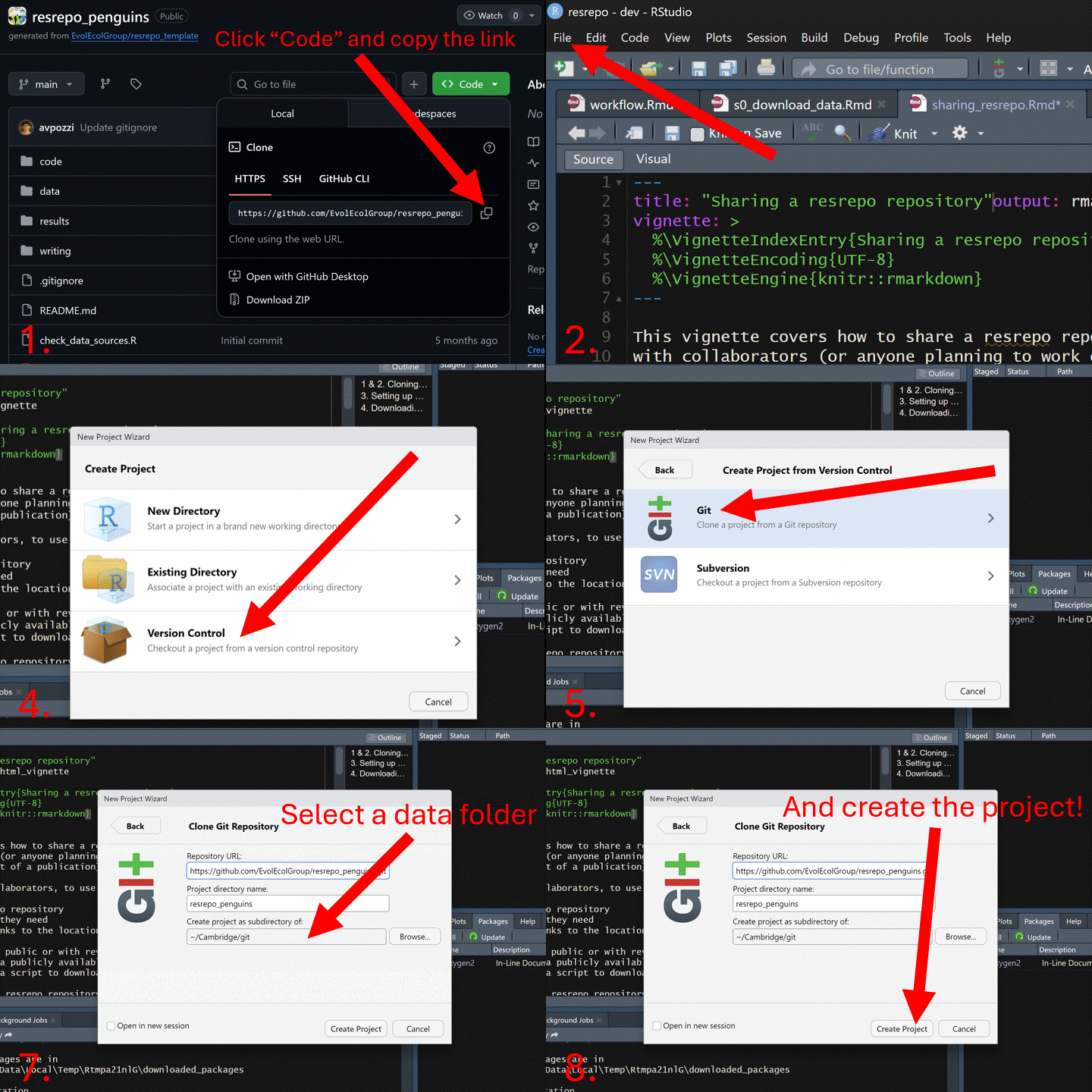
1 & 2. Cloning a resrepo repository and downloading
data
The following GIF shows how to clone a resrepo
repository using GitHub and RStudio.
You’ve cloned a resrepo repository with code, but the
data required for the analyses are located elsewhere, outside the cloned
repository.
fs::dir_tree()
#> .
#> ├── README.md
#> ├── check_data_sources.R
#> ├── code
#> │   ├── README.md
#> │   ├── s01_download_penguins.Rmd
#> │   ├── s02_merge_clean.Rmd
#> │   └── s03_pca.Rmd
#> ├── data
#> │   ├── README.md
#> │   ├── archive
#> │   │   └── README.md
#> │   ├── data_sources.csv
#> │   └── version_meta
#> │       ├── initial.meta
#> │       ├── intermediate_in_use.meta
#> │       ├── raw_in_use.meta
#> │       └── starting.meta
#> ├── resrepo_manual.md
#> ├── results
#> │   └── README.md
#> └── writing
#>     └── README.md
As you can see from the above tree, data is an empty
folder, this is because no data are stored in the repository.
Therefore, you need to take two steps:
- Download the data from where they are stored and place them in a location of your choice (e.g. a folder on your local machine, a synced folder, etc..)
- Set up the symlinks to point to the location of the data you just downloaded
Moreover, as you can see, this repository contains the folder
version_meta which indicates to us that this repository has
been versioned. If you are not familiar with the concept of versioning,
please check the data versioning vignette.
As an example, we will create a directory to act as our external data
storage folder. Note that we we are creating this folder in the
temporary directory, but you should choose a location anywhere on your
local machine. We will call this folder
external_data_storage_new.
# create new external folder for data
external_data_storage_new <- file.path(tempdir(), "external_data_storage_new")
dir.create(external_data_storage_new)
It is important that the external data folder where you store your
data is structured in the exact same way as your data
folder within your resrepo repository. Otherwise
resrepo will not be able to find the files.
Ideally, the directory structure of the data shared with you for this
project should already match the structure of the data
folder in the repository. Check with the person who shared the
repository with you if you are unsure about this.
In the following example, we will create the substructure of the
data folder, which contains starting/raw and
initial/intermediate directories,
intermediate_path <- file.path(
  tempdir(),
  "external_data_storage_new/initial/intermediate"
)
raw_path <- file.path(tempdir(), "external_data_storage_new/starting/raw")
dir.create(intermediate_path, recursive = TRUE)
dir.create(raw_path, recursive = TRUE)
And then we will copy the raw data into
external_data_storage_new/starting/raw:
file.copy(
  from = system.file("vignette_example/tux_measurements.csv",
    package = "resrepo"
  ),
  to = raw_path,
  overwrite = TRUE
)
#> [1] TRUE
3. Setting up symlinks to data
Because this repository has been versioned, we need to set up
versioning in our local repository. Now that our
external_data_storage_new folder contains the data, we can
do this using version_setup.
We need to supply the argument resources_path to
version_setup, which is the path to the external data
storage folder:
version_setup(quiet = TRUE, resources_path = external_data_storage_new)
#> This resrepo repository has already been versioned. To update the links to point to the data location on your machine or in an external hard drive, please run version_relink with the appropriate 'resources_path' argument.
fs::dir_tree()
#> .
#> ├── README.md
#> ├── check_data_sources.R
#> ├── code
#> │   ├── README.md
#> │   ├── s01_download_penguins.Rmd
#> │   ├── s02_merge_clean.Rmd
#> │   └── s03_pca.Rmd
#> ├── data
#> │   ├── README.md
#> │   ├── archive
#> │   │   └── README.md
#> │   ├── data_sources.csv
#> │   └── version_meta
#> │       ├── initial.meta
#> │       ├── intermediate_in_use.meta
#> │       ├── raw_in_use.meta
#> │       └── starting.meta
#> ├── resrepo_manual.md
#> ├── results
#> │   └── README.md
#> └── writing
#>     └── README.md
We can now see that we have data/intermediate and
data/raw folders. These are both links which point to the
versions folder, and versions points to our
external data storage (easy isn’t it!);
data/intermediate -> versions -> external_data_storage_new/initial/intermediate data/raw -> versions -> external_data_storage_new/starting/raw
We can also check the structure of the
external_data_storage_new folder:
fs::dir_tree(external_data_storage_new)
#> /tmp/RtmpiS3rNx/external_data_storage_new
#> ├── initial
#> │   └── intermediate
#> └── starting
#>     └── raw
#>         └── tux_measurements.csv
4. Downloading data from a public location
If you are sharing your repository with the public, you will need to
upload your data to a publicly available location (e.g. Zenodo, Dryad,
OSF, etc..) and provide a script to download the data. You may also
require data from other public repositories (e.g. GBIF, GenBank, etc..).
The script to download the data should be placed in the
code folder of your resrepo repository, and
should ideally be named s0_download_data.Rmd. It should
download all the data from the different sources and place them in the
appropriate directory (see Section 2 above).
After doing so, you can then use version_setup to set up
the symlinks to the data as shown in Section 3 above.
You can find an example of an s0_download_data.Rmd in
the inst/vignette_example folder of the
resrepo package or see the code below:
# First, we will create an external data folder to store
# the data and will link to it from the `data/raw` folder.
# You can see how to do this in the `sharing_resrepo` vignette.

# create new external folder for data
external_data_storage_review <- file.path(
  tempdir(),
  "external_data_storage_review"
)
dir.create(external_data_storage_review)

# load inborutils to download from zenodo
library(inborutils)

# download data from zenodo
doi <- "10.5281/zenodo.17287488"
inborutils::download_zenodo(doi, external_data_storage_review, quiet = TRUE)

# Now we can see that the files have been downloaded to
# our external data folder.
list.files(external_data_storage_review)